Table of Contents
- Introduction
- Planning the experiment
- Cost considerations
- Testing Copilot coding agent
- Code review comments
- Improvements mid-way
- Our pain points
- Performance considerations
- Main takeaways
- Resources
- Conclusion
Introduction
This blog post is part of a series where I share how AI is augmenting my work, and what I’m learning from it. If you’re interested, you can read the second post here: Lessons learned improving code reviews with AI. In that post, I reference how we are adopting AI for code reviews. This one is a deep dive into how we experimented with GitHub Copilot coding agent, to see how it could fit our team’s needs. Truth be told, we are using Claude Code a lot more, it’s the tool we are focused on and have adopted, but that will be a separate blog post in this series 😆.
Our approach was simple: experiment in order to learn what works. We are still learning and improving, but the more we use and optimize these tools, the more leverage we gain as a team. Let’s get into the details.
Planning the experiment
Okay… we all have heard of Copilot coding agent by now. You probably have heard that at GitHub, this agent is the number 1 contributor in their code base at the keynote and their roadmap webinar Q1 2026
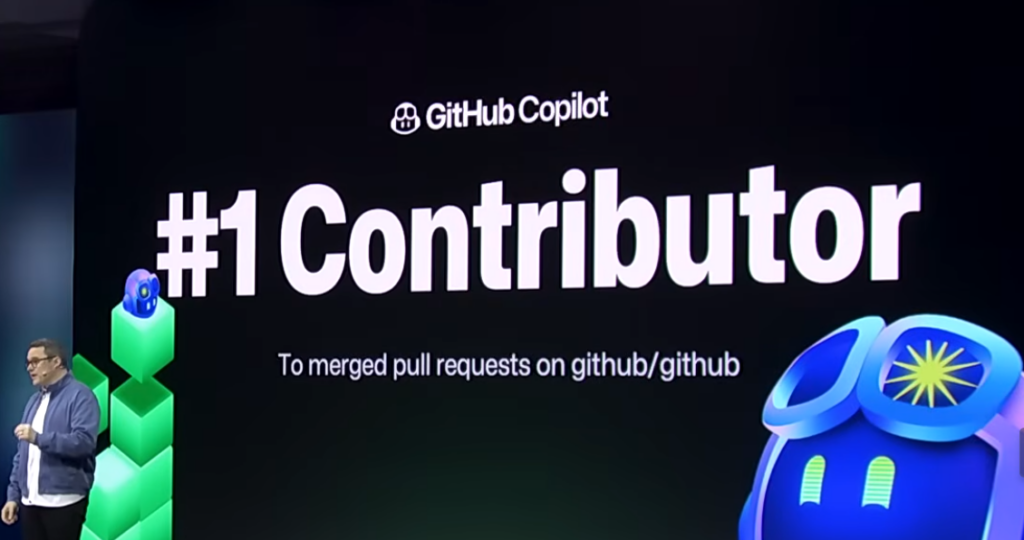
Well… to me this is the same statement that Dario, CEO of Anthropic, made of “in 3-6 months AI is writing 90% of the code”. I’m glad it works for them, and they can spend their marketing budget and strategy on these slides and statements. But it’s not the metric I care about. I’m fine not having to type in a keyboard to write 90% of the code, but measuring LOC just doesn’t make sense to me. That says nothing about the quality of the merged code, bugs introduced, etc. They are hype-driven statements in my opinion 🤣. Nevertheless, it leaves this question in my mind: could coding agents work effectively and produce high-quality PRs?
We have been doing quite a bit of experimenting with GitHub Copilot coding agent and Claude Code, to try to answer this question. Maybe we can replace most of our typing on a keyboard to prompting. Our goal is nothing like GitHub, we have nothing to sell… they do 😅. Our motivation is to keep improving the way we work and bring value to real customers. So I’ll share what we have done and experimented with GitHub Copilot coding agent 🙂.
We planned this before the change to usage-based billing, since I had still 70% premium tokens left in August, and they reset every month, we were like:

Why not spend them all in a ton of coding agent experiments 😄 ! So we did 😆. Our approach was this:
- Pick 1 task that is prioritized for our next release to give to the coding agent
- Pick 1 other backlog item or general task we would like to be done, some bugfixes, or code improvements
- Assign all tasks to a coding agent (most would be Copilot, others would go to Claude third-party agent)
- Go do another task, then after a while, review PRs
- Report on the premium token usage + number of PRs + quality of the output + number of comments
- Start the cycle again with more tasks on the next month
Again, our goal is to experiment in order to learn what works. We did this experiment in August 2025, some other months and again in March 2026 (mainly since there were many improvements introduced). It’s important to note our focus was on Copilot, not any other third-party agent. We did not use Codex, and only used Claude on some of the tasks for this experiment.
Cost considerations
We did not analyze or think a lot about costs. The goal was to experiment and see the quality of the PRs on different tasks. But suffice to say, the billing change is a necessary change. We were able to hit the 59min timeout on tasks that should not cost 1 premium request, or get a lot of tool calls for that cost, like:
| Prompt | Branch changes against master | Output |
|---|---|---|
| please check all work that is done here in this branch, vs the master branch, and do a thorough code review using all skills available. Focus on bugs and then code quality too. Use multiple subagents, each with their own perspective and goal | ~47,300 additions and ~11,000 deletions | Error hitting 59min timeout. Used 4 subagents. We hit the error model_max_prompt_tokens_exceeded with the message “prompt token count of 530706 exceeds the limit of 64000” |
| improve memory consumption of function X. Acceptance criteria: Memory should not exceed Y, regardless of the amount of items being processed. | ~900 additions and ~40 deletions | Success in 53min |
I’m sure you have seen plenty of engineers using a lot of inference for 1 premium request or for 20 dollars of a Claude Code subscription 😅. Anyway, if we were to adopt Copilot Coding agent in June, we would need more controls to control GitHub actions minutes and overall token usage + re-evaluate the cost-benefit.
Testing Copilot coding agent
I’ll share an approximation of the results we got:
| Author | PRs | Merged | Merge rate |
|---|---|---|---|
| Copilot coding agent | ~130 | ~30 | ~23% |
| Third-party Claude agent | ~5 | 0 | 0% |
| Human developers | ~400 | ~390 | ~98% |
| Size (lines changed) | Copilot/Claude PRs |
|---|---|
| S (10-49) | ~12 |
| M (50-199) | ~48 |
| L (200-999) | ~55 |
| XL (1000+) | ~20 |
Again, this is mainly an experiment so merge rate is expected to be very low. A lot of Copilot coding agent PRs were spikes/exploration or using GitHub custom agents to analyze PRDs, do security reviews, etc.
Let’s talk about the quality of the PR when Copilot asked me for a review. First and foremost, I don’t think we have a high bar for quality PRs compared to other successful software teams. To me, a high-quality PR is expected, always, period. Second of all, many draft PRs I’ve created and seen other engineers create, are usually a v0. It’s a version we publish to get feedback from engineers on our team, it’s never actually ready to be merged. All Copilot PRs are created as drafts, to me this signals Copilot really just did a v0, even if it says it has completed everything and everything works. My current opinion is this is made on purpose, to give you a chance to steer Copilot again in its implementation, and do an initial code review to spot things that are wrong.
I’ve not seen any docs, or official statements from GitHub supporting my claim. With that said, I’d like an option to enable Copilot to continue iterating on their PR and only ask me for a review when it’s no longer a draft. But this coding agent might not evolve in that direction since their marketing and docs so far are focused on small & medium tasks. Cost control becomes very important too with long-running agents.
To simplify things, we’ll say asking me for a review is the same as another engineer asking me to review their PR. Any engineer in our team (or generally in the world) only assigns a co-worker a PR for review once the PR is ready, has finished work and they tested and reviewed their own work. From our experiment so far, Copilot was not able to have a ready and polished PR in most PRs, so I need to leave a lot of comments saying the countless wrong parts. One of the problems is the feedback loop, we didn’t make the Playwright MCP work for us since we have limitations on the front-end login flow. So the agent doesn’t deliver the necessary code for front-end tasks.
Code review comments
In terms of the comments I made, alongside CCR and Claude Code before marking the PR as ready for review, it’s around 20-30. The ones that got merged usually had under 20 comments and most discussions weren’t critical or about low-quality code. Again, it appears to me these were mostly low-to-medium tasks that were clearly defined and the agent did well. Our closed PRs and a few of the experiments got 40+ comments, for various reasons:
- Unnecessary test cases
- Re-implemention of certain modules and functions was necessary
- Removed existing functionality
- Low quality code and not adhering to coding standards and best practices (e.g. a lot of duplicated code, missing error handling)
- Missing front-end implementation
- Usage of non-existent CSS classes
The ones that got closed and were simple experiments didn’t receive much review. I understand that isn’t a great thing for the experiment, but we simply invested more time in some PRs rather than all, again some are just spikes or over the top on purpose.
It’s not the same thing as our own team PRs, of course, since these draft PRs are done in like ~15min. But the number of comments necessary to have these draft PRs ready to be reviewed by another human (and AI tools, like Copilot itself, Claude and CodeRabbit) is important. Since it’s time I’m spending reviewing code. I don’t want to be bothered when there are still typos and acceptance criteria is not fully met 😅.
Improvements mid-way
I had features Copilot coding agent didn’t do very well, which then prompted me to ask for a way to ask clarifying questions. The agent dashboard is nowadays a lot better, and we can start with this type of planning and make it ask clarifying questions too. I only experimented with this a few times, mostly because we started to add more context and details in the GitHub issues, and because steering costs more premium requests. This also matches Cursor’s best practices of “plan before coding”, a best practice that is mentioned everywhere and by all AI labs for good reason.
After some PRs, we would also try to tweak the instructions.md to see if it improves anything. It’s a bit hard to know for sure if some changes to our prompts/instructions really improve the LLM’s quality. Just by experimenting and tweaking, can we really see if in the future PRs it works better. We also didn’t configure copilot-setup-steps.yml. We know the max timeout for the coding agent is 59 minutes currently. There weren’t many options we wanted to configure in this file for our experiment.
GitHub also shipped the ability for the coding agent to use Copilot code review and it runs CodeQL as well. Which is great, some of our pain points were kind of addressed here, since it prevents some issues from reaching a human reviewer. Still… we had issues and opinions on the PRs we experimented and saw, so let’s go through them now 🙂.
Our pain points
Tests
There are several times when Copilot didn’t run all unit tests. Or Copilot says “tests pass”, when in fact it didn’t wait for all tests to finish so it can’t know if tests pass… Here is an example of a comment I left Copilot after I reviewed the PR:
"copilot" there are several issues and missing implementation. Please make all the following changes:

## Front end
- **Missing** the entire front-end implementation, please make the necessary changes using the design system and with the acceptance criteria in the GitHub issue

## Testing
- Please please follow coding standards on all methods
- You should include unit tests to your implementation of X
- Delete all assertions of the `exception.Message`, because it's something that can change, and that makes it a fragile test
I read some session logs and found interesting things. Sure, I didn’t specify a lot about what unit tests to run in the prompt, but I’d actually prefer running all unit tests since we can make changes that break other areas in our codebase. But, in the end, it also didn’t wait for tests to run and see if everything passes. I don’t expect to see the wording “tests pass” if the agent simply didn’t wait for them to finish. Honestly, this is not that bad, we can run them ourselves or later in our CI check… but again I want to refine our instructions file in order for coding agents to always follow them and produce better quality PRs. Instruction following depends on the LLM, but there are still improvements here for sure.
Doesn’t follow our PR template
It just doesn’t follow our PR template. Sure, it’s a small thing, maybe a temporary limitation. But I mean in general, whenever Copilot publishes a comment on the PR saying “Fixed! This is done….”, but then I see that it’s not done and the PR description is something like this:
## Definition of Done
- [x] PR follows template format
- [x] Code review comments addressed
- [x] Implementation follows C# coding standards
- [x] Build warnings fixed
- [x] Core functionality implemented
- [ ] Final Application compilation issues resolved
- [ ] All tests passing
Every time, I’m like:

Lack of docs on installed tools and observability
This is a nitpick I know, but since I was reading the session logs I found the copilot coding agent has access to python3. I didn’t know this was the case from Copilot Coding agent docs, but it makes sense since our GitHub actions runner uses ubuntu. I mean we have the firewall on, but it would be great to know how to deny access to these tools. I’m also not about to dunk too hard on GitHub about the observability around this feature, because they rely on GitHub actions. We all know what telemetry we can get out of those… From an engineering perspective, Copilot Coding Agent lacks a lot, I mean a lot, when it comes to observability. No OpenTelemetry, no nothing. It’s clearly not a priority or concern for them, I can understand that, but I don’t agree with that decision. Claude Managed Agents has some stuff like tracing, but I guess not a lot of companies have observability as a priority or concern for cloud agents.
No reasoning around a simpler solution
We saw a few PRs where the agent simply jumps and fixates on the first solution, without reasoning about the trade-offs and alternatives there are. We’ll dive deeper about one scenario concerning performance considerations, but for now I’ll keep it light. In one task where we assigned Claude agent, the bug we wanted to fix is dead simple. It’s one function, a string extension method, that is not handling edge cases correctly when parsing class names. The solution in the PR was using StringBuilder and a for loop with some logic to decide how to parse and handle the edge case. It’s not wrong, but I prefer simpler code. Sure, with an initial prompt that says something like “don’t forget to code review your solution at the end”, perhaps it would have caught and reasoned about if there were simpler solutions, using Regex for example. Maybe the Claude third-party agent can’t do that, only Copilot coding agent can, no idea though.
Reliability problems
We experienced errors sometimes, or hit unfortunate limitations or bugs. Of the ~130 Copilot PRs, we got around 30 failed GitHub actions runs. Due to various errors but sometimes I can’t even know why, for example, when the session fails I can’t always see the full logs in that job run. The GitHub actions UI only shows “This job failed” with the annotation “Unhandled exception. System.IO.IOException: No space left on device”. Well… great, thanks for the info. Couldn’t you truncate or do something to reliably show me some verbose logs? What contributed most to disk space? Is the agent getting too much output in tool calls that is saved in files on disk? What tools produced the most output tokens? Did the agent make tool calls that are inefficient and wrong? What happened exactly? Not the best UX… Sure, there are larger GitHub actions runners. But I don’t want to throw money at a problem I don’t know the root cause to…
Some sessions we hit the 59min timeout, but I feel like we shouldn’t. One copilot coding agent session was about code review on a branch with this prompt: “please check all work that is done here in this branch, vs the master branch and do a thorough code review using all skills available. Focus on bugs and then code quality too. Use multiple subagents each with their own perspective and goal”. I wasn’t expecting a 59min run even with 5 subagents, then I saw this on the logs:
20:25:43.4654572Z Start flushing callbacks
20:53:35.0823201Z ::***::
20:53:40.0920377Z ##[error]The operation was canceled.
What is this? Why did the actions runner take ~30min to flush callbacks 😅. The code review was done already, I don’t understand why it failed the whole job, so it’s a bit frustrating to spend these Actions minutes…
Also, we assigned Copilot to an issue and immediately got a comment saying “The agent encountered an error and was unable to start working on this issue: This may be caused by a repository ruleset violation. See granting bypass permissions for the agent, or please contact support if the issue persists. (Request id: X).” Well… no, i know for a fact it’s not a ruleset violation or permissions related. I assigned the Claude agent next to this issue and it worked. Just to test it again, I assigned Copilot again after some days to this issue. It started working and made a WIP PR, until it failed with this error:
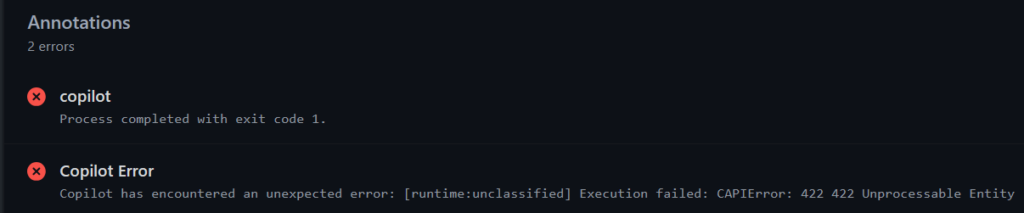
Then I see the agent session logs and find these type of errors:
stderr: "fatal: path 'Tests/SuperCoolTests.cs' exists on disk, but not in 'X'\n"
(...)
[cca-engine] Failed to disconnect session X cleanly: Error: Connection is disposed.
[cca-engine] Fatal: Error: Execution failed: CAPIError: 422 422 Unprocessable Entity
The fatal error “exists on disk” happened 6 times during the code review step with CodeQL. I mean, is it the root cause of the 422 error… maybe not, I don’t know. Sure, these might be “nitpicks” but in a way, it says something about the reliability of this feature. Reliability is something that users can cancel subscriptions for, if they find alternatives that are reliable and fit their needs, for example.
Performance considerations
One of the more interesting things the Copilot coding agent did, that I didn’t like, was on one PR to refactor this:
var tasks = items.Select(item => ProcessItemAsync(item));
await Task.WhenAll(tasks);
Into this:
foreach (var item in items)
{
    await ProcessItemAsync(item);
}
I read the session log to understand why it did this, because in this case, this is not the best solution. For context, this PR is supposed to fix a concurrency issue due to how we use OpenConnectionAsync in the DbContext. The code throws the exception System.InvalidOperationException: The connection was not closed. The connection's current state is connecting. Also, a single DbContext isn’t thread-safe, so concurrent calls through Task.WhenAll will throw this exception. I don’t want sequential processing just to fix this concurrency issue. So here is the snippet of the agent’s internal reasoning in the session logs:
"The real problem surfaces in X.cs, where multiple concurrent calls to Y are fired simultaneously for different IDs. Since they all share the same DbContext and connection, this concurrent access causes contention on a single connection that's never properly closed. The fix requires addressing both the connection lifecycle and the concurrency issue. While adding try/finally blocks to close connections in the repository methods would help, the underlying problem is that a single DbContext isn't thread-safe, so concurrent calls through Task.WhenAll are fundamentally problematic. The most practical immediate solution is to ensure connections are properly closed after each repository method completes, which should at least prevent the connection exhaustion that's currently happening. that open connections
2. In X.cs, change from concurrent Task.WhenAll to sequential processing to avoid concurrent use of the same DbContext"
It just seems it was focused on fixing the concurrency issue, not considering the performance trade-off of this solution. Actually, it does seem some other PRs the coding agent creates has this behaviour as well. Jumping and fixating on a solution, without reasoning about the trade-offs and alternatives there are (this was a Claude Opus 4.6 copilot coding agent session by the way 😅). I mean… should we have given the context of how big this items list can be in production? Should we ask explicitly to consider the performance of its code? Well, maybe, but I was hoping Opus 4.6 could think like an engineer 😅. Either way, maybe a better feedback loop would help the agent as well, like performance tests that the agent can run after making this fix. That way, the agent could measure the cost of the code it’s making. I guess that is what we should all do anyway. Improve these feedback loops since they help agents and humans do better work. Sounds obvious, but it could probably really have improved this PR 😅.
We ended up refactoring this code in this PR because it doesn’t even make sense to process this list with a Task.WhenAll(tasks) when we can make a better DB query that is more performant and cleaner.
Main takeaways
So did Copilot coding agent do a good job? Well, I’d argue it could have been better, so I’m curious to see if we can give even better instructions and provide more context. Including some context that can be useful for Copilot directly in the issue description is always a good idea, like relevant files to skip some of the searching and grepping. Also, I acknowledge our feedback loop could be better and something that would help the coding agent for sure. Also… mister LLM was not running all tests and waiting for them to finish. So they could be failing, but it was all good for the coding agent… well, not good enough for me 😅. What I really don’t want is for the coding agent to say in the end “All tests pass”, and then I check the full logs and see “(…) ok tests are taking too long to build and run. I’ll proceed with the other tasks.”
The workflow of giving work to the agent, then go do something else entirely, and comeback to review worked well. Especially since the copilot sessions take like ~15min, so I enjoy having the agent work in the background instead of having it on my VS Code, waiting for me to approve commands or provide feedback. If I can steer it in the right direction from the start, it tends to do a decent job for the initial PR. The challenge is reducing the number of iterations in a PR until it’s considered done. Having them work in the background can increase the feedback loop of: getting code -> reviewing code -> asking for revisions.
However, delegating a task to an autonomous cloud agent and reviewing big PRs at the end is a fundamentally different workflow from iterative, step-by-step collaboration (e.g. VS Code Agent mode, or CLI). Sure, it’s cool to delegate some PRs at the end of the day, and then come back tomorrow to review that code. But it’s not very practical unless the quality of that PR is high or the task is very small in scope. I see a lot of engineers in the industry enjoying cloud agents a lot, but for me, I still prefer coding agents running locally with an iterative back-and-forth collaboration, then create a PR from that (plus I can gather more telemetry locally 🙂). Like Stephen Toub said in his blog post, iteration is expected:
If you expect CCA to get it right the first time with zero human involvement, you’ll be disappointed a non-trivial percentage of the time. Expect multiple rounds of review feedback with you providing clear, specific, and actionable feedback.I just prefer to do it locally. The one scenario I truly prefer autonomous cloud coding agents is when I’m on-call doing monitoring and SRE type work. Handling support tickets, checking logs, dashboards, exceptions and possible improvements to our runbooks and overall codebase. I can assign tasks like bug fixing or test coverage gaps to the cloud agent, go back to Grafana. An hour later I come back and assign Copilot Code review and Claude, then go back to monitoring. When reviews are done I tell the cloud agent to fix all bugs or issues. The next day before my SRE type work I can do some code review on a PR that is in a better state, test it myself and go on from there. Cloud coding agents fit the workflow of delegating these tasks and it works well for me.
So in short, for the clear well-defined tasks the agent produced a good quality PR that got merged sometimes. For the complex features and bug fixes, that require searching and understanding many files in the codebase, it does a worse job. If the task is complex, it will require more thinking, reading multiple projects and just raw domain knowledge. It still provided value in the PRs we experimented on, since a lot of the tasks we experimented on were indeed medium complexity. Honestly, we have other tools that produce good quality PRs for clear well-defined tasks.
Resources
- Ten Months with Copilot Coding Agent in dotnet/runtime
- .NET MAUI team’s experience with Copilot coding agent
- How the .NET MAUI Team uses GitHub Copilot for Productivity
- Simon Willison – Agentic Engineering Patterns
- Best practices for coding with agents
Conclusion
We will keep experimenting a little with GitHub Copilot coding agent or other agentic tools the Copilot subscription supports (e.g. OpenCode, Codex). But it’s fair to say we’ll be doubling down on our adoption of Claude Code as our agentic coding tool. Like I’ve said in the posts of this series, the Jagged Frontier keeps moving and knowing where the task you give these tools falls inside the frontier or not, defines how much you are augmented. If we can get more of the low-medium complexity tasks done right, reliably and ensure quality along the way. I’m certain we will be very happy and continue working on more complex tasks that provide value to our customers. Since I have seen LLMs lacking the judgement, trade-off analysis and decision making engineers have, I prefer the collaboration I can have from local sessions and not a cloud agent session.
Don’t forget to stay critical and don’t let yourself be swayed by all this hype. Test things yourself, don’t over-trust outputs from a tool, come up with your own solutions and adopt what works.
My next blog post in this series will also be about agentic coding tools, in this case, Claude Code! Are you using AI coding agents? I’d love to hear from you what your experience has been. Leave a comment and let’s chat 🙂 .