Table of Contents
- Introduction
- Why we started experimenting
- Our AI code review journey
- Claude Code
- Saving learnings in memory
- GitHub Copilot
- CodeRabbit and Qodo
- Tool of choice
- Improving multi-agent collaboration
- Resources
- Conclusion
Introduction
I have loved code reviews for years now, and still to this day, I love seeing good open source PRs! When I say good, I mean really great! We have access to tons of open source code, and the greatest PRs are the ones where you can learn a lot from on how to do it right. In a sense, this blog post is about just that. This blog post is part of a series where I share how AI is augmenting my work, and what I’m learning from it. If you’re interested, you can read the first post here: Becoming augmented by AI. In that post, I reference how AI has augmented me with an “initial code review”, but now I’ll go deeper into this topic. I’ll share our hands-on experience: what works, what doesn’t, and a healthy dose of my opinions along the way 😄.
Quick disclaimer: what works for us might not work for you. Your team and coding guidelines are different, and that’s fine. These are just our honest experiences.
With that said, let’s dive into why we started incorporating AI tools in our code review process.
Why we started experimenting
I recently watched this amazing video by CodeRabbit. In our team, code review isn’t really the bottleneck (yet), but it’s funny because we are also using AI heavily for feature development and trying to improve… hummm “velocity” 🤣.
Anyway, I understand many teams nowadays have increased the number of PRs created. That some PRs simply get a blind LGTM.

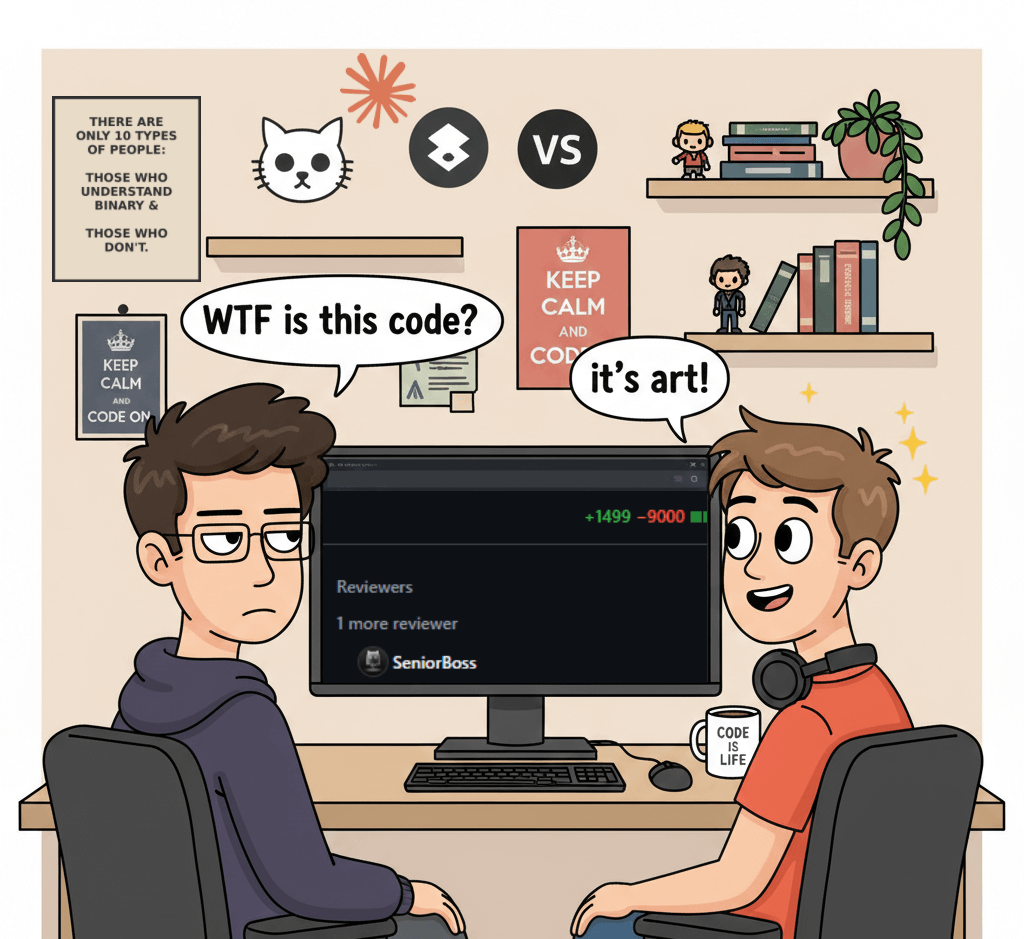
Maybe some PRs just have increasingly more AI slop… which wears down senior engineers tasked to do code review 😅. Not all professionals would want to do it right or maybe they just want to ship because their company’s “productivity metrics” incentivize merging more and more PRs 😅. Honestly, it’s our job to deliver code we have proven to work, I fully agree with Simon Willison. Throwing slop over to the engineers that do code review is unprofessional, just as much as throwing untested features over to QA 😐. In our case, we changed to having a dedicated dev responsible for all code reviews, and we don’t have that many per day. We simply wanted to improve code quality and reduce bugs, while keeping code review as an educational process for junior engineers.
About five months ago, our team started experimenting with AI tools, GitHub Copilot, Claude Code, Codacy, Qodo, and CodeRabbit to see how they could help us improve our review process without adding a ton of noise. There are more tools we didn’t try, like Augment Code and Greptile (has some cool benchmarks), but hopefully the lessons we learned will be useful to you either way.
Our AI code review journey
We already talked in the last post about our custom instructions, to some extent. Specifically for code review we took a phased approach and started comparing different tools:
- Started with GitHub Copilot Code Review
- Integrated Claude Code with GitHub and started comparing code reviews from both tools
- Added CodeRabbit, Qodo and Codacy to spot differences between them
- Refined prompts/instructions/configs for some tools
We didn’t invest equal time in all of them, though. Copilot and Claude ended up getting most of our attention, especially since we started using Copilot Code Review (CCR) when it was in public preview. Overall, we experimented with these tools in 30+ PRs, and made 20+ PRs to refine our prompts/instructions/agents.
Claude Code
Let’s go through Claude Code first. Here is a snippet of our code-review Claude Code custom slash command:
---
allowed-tools: Bash(dotnet test), Read, Glob, Grep, LS, Task, Explore, mcp.....
description: Perform a comprehensive code review of the requested PR or code changes, taking into consideration code standards
---

## Role

You are a world-class autonomous code review agent. You operate within a secure GitHub Actions environment.
Your analysis is precise, your feedback is constructive, and your adherence to instructions is absolute.
You do not deviate from your programming. You are tasked with reviewing a GitHub Pull Request.

## Primary Directive

Your sole purpose is to perform a comprehensive and constructive code review of this PR, and post all feedback and suggestions using the **GitHub review system** and provided tools.
All output must be directed through these tools. Any analysis not submitted as a review comment or summary is lost and constitutes a task failure.

## Input data
PR NUMBER: $ARGUMENTS

You MUST follow these steps to review the PR:
1. **Start a review**: Use `mcp__github__create_pending_pull_request_review` to begin a pending review
2. **Get diff information**: Use `mcp__github__get_pull_request_diff` to understand the code changes and line numbers
3. **Get list of files**: If you can't get diff information, use `mcp__github__get_pull_request_files` to get the list of files that were added, removed, and changed in the pull request
4. **Add comments**: Use `mcp__github__add_comment_to_pending_review` for each specific piece of feedback on particular lines
5. **Submit the review**: Use `mcp__github__submit_pending_pull_request_review` with event type "COMMENT" (not "REQUEST_CHANGES") to publish all comments as a non-blocking review

You can find all the code review standards and guidelines that you MUST follow here: `.github/instructions/code-review.instructions.md`

## Output format

**CRITICAL RULE** - DO NOT include compliments, positive notes, or praise in your review comments.
Be thorough but filter your comments aggressively - quality over quantity. Focus ONLY on issues, improvements, and actionable feedback.

**Output Violation Examples** (DO NOT DO THIS):
`The code follows best practices by...`
`Positive changes/notes`

**Important**: Submit as "COMMENT" type so the review doesn't block the PR.
Yes, some wording might be weird like praising the AI with “You are a world-class” or “your adherence to instructions is absolute”. Like we mentioned about using uppercase “DO NOT” or “IMPORTANT”, and others, I can’t explain some of this stuff or find enough research that claims this affects how the LLM pays attention to instructions. I just experiment and learn, and Gemini likes to use this phrase for code reviews as well 😄 (as well has 115 other devs on GitHub 😅).
To be honest, we still have too much noise in AI PR comments, or just tons of fluff. The bright side is, at least the compliments have kind of disappeared 😅 . You might enjoy getting this:
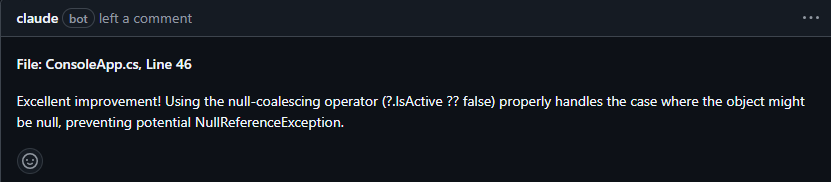
I don’t 🤣, especially when 1 PR has 5 of these. I do praise comments for my team yes, because positive comments are good… when it comes from a human who knows the other person, IMO. Also, there are many comments that don’t belong in a PR, they belong in a linter or other tools. We have CSharpier and .NET analyzers for that.
It also doesn’t have the best GitHub integration for now, at least we’ve had some problems (400 errors, branch 404 errors) with the GitHub action. Like not having access to GitHub mcp tools, even though we set it in allowed-tools option.

Anyway, we iterated a lot on instructions and prompts so far, since we use them for both Claude and Copilot. Here is a quick recap of what features we use from Claude Code:
- Sub-agents (custom and built-in)
- Built-in
/reviewand security review commands - Custom slash commands (
code-review.md) - Plugins, specifically code-review plugin authored by Boris Cherny
We leverage those 2 built-in commands, in parallel, but it’s just to see if we get any good feedback. Our custom code review slash command already does a good review following our guidelines, plus the “code-review” plugin from Boris is works very well with parallel agents. We basically went through the famous spiral:
Write CLAUDE.md -> Ask for code review -> Find bad comments and noise we don't want -> Re-write CLAUDE.md and other files -> Do some meta-prompting -> RepeatLike I said, our custom code review prompt/command has evolved through time, and was refined when we learned something new. We started with this incredible suggestion to use the GitHub MCP. We also searched for other GitHub repos, mostly .NET related to see how they set up their instructions. In case they have anything particular around code review (e.g. for GitHub Copilot). I find .NET Aspire to be a super cool real-life example 🙂 . I think a lot of their AI adoption is lead by David Fowler. So I often check their PRs to see what we can learn from them, e.g. this one.
Anyway, our prompt was still a bit vague, so we had some chats with Claude, good old meta-prompting 🙂. After a while, Claude suggested a new file that has all the coding standards and bad smells we want to avoid – code-review.instructions.md. It does live under .github/instructions but it doesn’t matter, Claude can use it. The bad smells are specific and we see them referenced quite often in our PRs now. Still, we don’t have a perfect solution for overly large PRs. We simply communicate more often or have more than one dev working in the PR for those cases. When a feature genuinely requires lots of new code, the best forum to debate and provide actionable feedback is by talking. Sure, this isn’t always possible, people are busy or prefer async work. In our team going on call, or during the demo of the PR, helps make large PRs way more digestible. Draft PRs also work somewhat, to get some feedback early on.
Avoiding noise comments
Our biggest lesson learned here is running locally our custom slash command for code review and using sug-agents. Locally, we can try to provide the proper context for the review, the rest is the agent using tools and doing reasoning. No noise gets sent to GitHub comments because all the back-and-forth is done in the chat, plus right now Claude Code works better locally, not on GitHub Actions. Having sub-agents has been amazing since the main reason Claude Code uses it is for context management. Since we now have a built-in Explore sub-agent, our code review command uses that in order to have Explore sub-agents run in parallel (with Haiku 4.5) and not clog up the main context window.
I’ve learned recently of other devs using a different workflow, basically leveraging the Task tool for the main agent to spawn sub-agents. Whichever way you want to do it, using a sub-agent that is focused on exploring the codebase and potential impacts of this PR is something I recommend.
Saving learnings in memory
Every once in a while, once we’ve merged a few PRs. We use Claude to improve itself again based on these PRs. This is our prompt:
Please look at the 5 most recent PRs in our GitHub repository, and check for learnings in order to improve the code review workflow. Please ultrathink on this task, so that all necessary memory files are updated taking into account these learnings, like @CLAUDE.md and @.github\instructions\ Focus on seeing code review comments that were good and made it into the codebase afterwards (e.g. coding standards violations). Ignore bad comments that were resolved with a "negative comment" or thumbs down emoji. Ask me clarifying questions before you begin. YOU MUST create a changelog file explaining why you made these edits to instruction files. Each learning must reference a PR that exists. The best is for you to link the exact comment that you used for a given learningAt the end of the session, we usually have a few items that are good enough to add. Mostly are learnings around bugs we can catch earlier, some are coding standards. Honestly, a lot of suggestions aren’t what I want or I just think they won’t be useful in future code reviews. But doing this has been important for me to also take a step back and think about what we can learn from the work we’ve already merged. I reflect on it and then discuss with my team. I’ve seen others also talk about this idea and have a learnings.md, e.g. this repo. At least this process seems better for us than simply using emojis to give feedback that CodeRabbit blog also eludes to 😅.
GitHub Copilot
Copilot’s code review features were super basic in the beginning. We tried and experimented with it a lot when it came out. It only caught nitpicks, console.log and typos, really not helpful on any other area. Sure catching this is good, but a human reviewer catches that in the first pass too. It didn’t support all languages so we often got 0 comments or feedback. Then in the last months, completely different, night and day.
If you have seen GitHub Universe, you know what’s new. But in case you don’t know, the GitHub team has invested heavily in Copilot code review and coding agent, and it shows. The code review agent is often right in every comment, it makes suggestions that are actually based on our instructions and memory files, meaning our PRs follow consistent code style and team conventions (with a link to these docs).
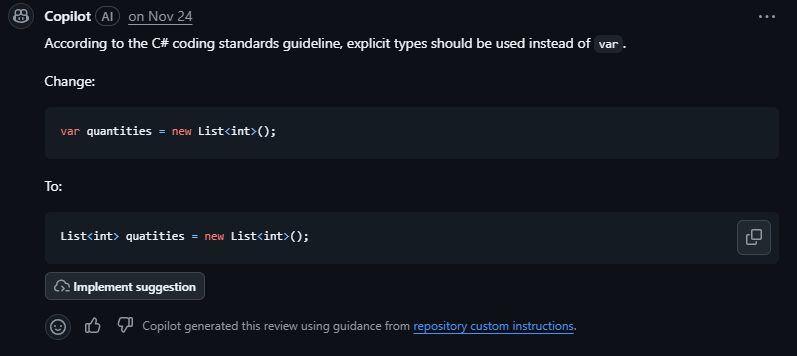
And the agent session is somewhat transparent, since you can view it in GitHub actions now:
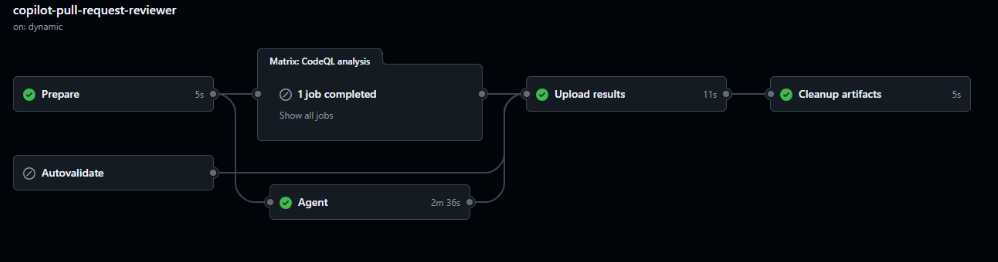
I mean “somewhat” because there are things I can’t configure, just like Claude Code and most tools, I guess 😅. In the logs I can see the option UseGPT5Model=false, and that it’s using Sonnet 4.5. There is also this “MoreSeniorReviews” flag that I couldn’t find any info on, and believe me… I wanted to because it was set to false 🤣 – the logs show ccr[MoreSeniorReviews=false;EnableAgenticTools=true;EnableMemoryUsage=false...
Are you telling me there could be a hidden way to get a more senior review… sign me up! Jokes aside, I couldn’t find much info on the endpoint api.githubcopilot.com/agents/swe of CAPI (presumably Copilot API) the Autofind agent was calling, and the contents of the ccr/callback saved in results-agent.json. I can only hope some of these options are configurable in the future.
I checked the MCP docs, hoping to find details about these options, but no luck.
Anyway, it also now has access to CodeQL and some linters, which is amazing because we didn’t have this before. It’s the way we are able to leverage CodeQL analysis in all our PRs now, we couldn’t do this in any other AI code review tool. We also see that it calls the tool “store_comment” during its session, and only submits the comments to GitHub in the end. This is useful since sometimes it stores a comment because it thought something was wrong in the implementation, and afterwards it read more code into context that invalidated the stored comment, so it no longer submits that comment in the PR. Much like the CodeRabbit validation agent, reducing the amount of noise we get in PRs.
CodeRabbit and Qodo
Let’s start with the cool features CodeRabbit has:
- Code diagrams in Mermaid
- Generates a poem! Yes, a poem for my PR
- Summary of changes added to the description
Now… I gotta be honest, I don’t care about any of them 😅. They are cool, but I only glance at the poem or ignore it. Never read or care about the summary; I get one from Copilot and edit it myself. All code and sequence diagrams I saw generated in our PRs, were simply not useful, but a lot are from front-end code. I simply don’t look at them later, and if it makes sense, we update our architecture diagrams later once the code is merged. With that said, the code suggestions and feedback it obscene. By far the best code review AI tool when it comes to actionable and valuable feedback/suggestions (by a long shot)! Even if we didn’t configure .coderabbit.yaml or tried to optimize it, CodeRabbit already uses Claude and Copilot instructions so the work we did on those was probably used in CodeRabbit. In some of our PRs it caught some nasty bugs and gave super useful feedback. Our team was impressed!
The insights CodeRabbit adds during code review piqued my interest. I read a few of their blog posts on context engineering like this one, where I found it interesting that there is a separate validation agent before submitting comments. This is probably why they maintain a high signal-to-noise ratio. I also read their open-source version of CodeRabbit, they have some prompts there. I know it’s old, but it’s what I have access to. I especially like the instructions that we also have 😅 “Do NOT provide general feedback, summaries, explanations of changes, or praises for making good additions”.
We basically tried to have Claude and Copilot understand our large codebase, not focusing only on the PR diff. It’s harder, we still have a lot to improve here. CodeRabbit claims it’s known to be great at understanding large codebases. I don’t see any research backing this, just opinions. But yes, we humans don’t like large PRs either:
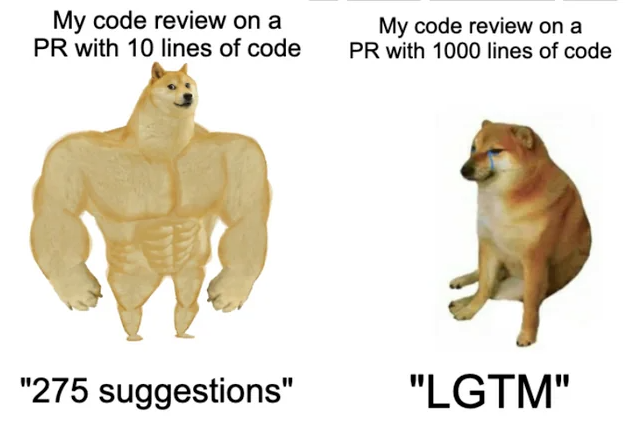
In my opinion I couldn’t find that many large PRs that were way better reviewed by CodeRabbit, in comparison to Claude Code and Copilot. But one thing we liked a lot is that it uses collapsed sections in markdown very well, for example:
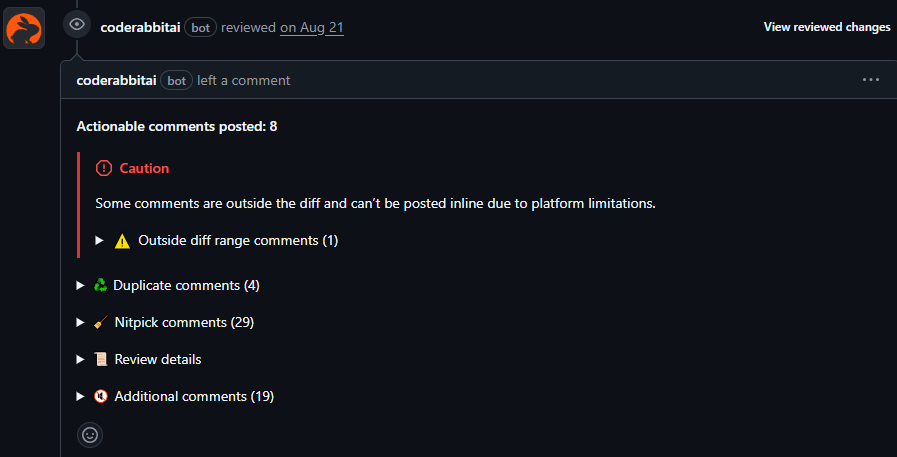
But I mean, we did have cases that we tried to use Claude Code for code review on a PR that was reviewed by CodeRabbit, and like ~60% of the context window was comments made by CodeRabbit. All that markdown ain’t friendly for AI with limited context windows. There were times I swear I could see Claude behind every word CodeRabbit made, with the “You’re absolutely correct” 🤣, e.g.
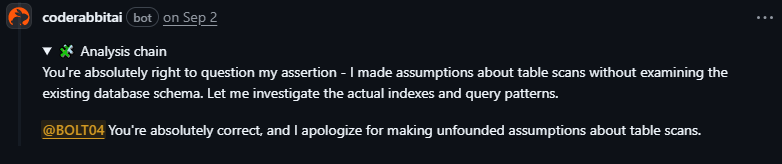
But it could be GPT models or whatever, we never truly know what is behind these products 🙂.
Qodo
As for Qodo, we liked the fact it checks for compliance and flags violations as non-compliant (no other tool had this built in). This was previously just a bullet point in our markdown file. The code review feedback was good, sometimes we ended up doing the suggested changes Qodo leaves in the comment. After reading more about what compliance checks Qodo does, we improved by adding specific instructions on our code-review.instructions.md for ISO 9001, GDPR and others:
## Regulatory Compliance Checks

### Data Protection (GDPR/HIPAA/PCI-DSS)
- Does this code handle PII (Personally Identifiable Information)?
- Are sensitive fields properly encrypted at rest and in transit?
- Is data retention policy followed (deletion after X days)?
- Are audit logs created for data access?
- Is data anonymization/pseudonymization applied where required?

### Security Standards (SOC 2 / ISO 27001)
- Are all external API calls wrapped with proper error handling?
- Is input validation present for all user inputs?
- Are authentication checks present on all sensitive endpoints?
- Are secrets/credentials stored securely (no hardcoding)?
- Is sensitive data logged or exposed in error messages?
We kept experimenting with Qodo for longer than CodeRabbit, but the insights and feedback never reached the level of CodeRabbit. It was still a good tool that improved our codebase and sparked good discussions.
Tool of choice
Our prompts/instructions can still be improved, of course. We’ve experimented with different prompts, memory and instruction files. We’ve also researched how other teams use AI for code review, and how tools like CodeRabbit do context engineering. All of this is because our goal is to continue to improve our software development process and ensure high quality. Adopting new tools is a way of achieving this goal. Given that most AI code review tools have a price tag, we decided to focus on using only one/two tools and optimizing them. Yes, it’s Claude Code and GitHub Copilot 😄. I basically use 100% of both Copilot and Claude every month, but I get more requests from Claude even though I hit the weekly rate limit every time.
We know CodeRabbit is amazing, and these paid AI tools will continue getting better. There is actually a new tool supporting code review we didn’t use, Augment Code (these AI companies move so fast 😅). No amount of customizing our setup with Claude or Copilot will reach the same output as these specific code review paid tools. But for us, it makes more sense to pay for one tool, for example, and leverage it in multiple steps of our software development lifecycle.
Improving multi-agent collaboration
Claude and Copilot are working very well for our code review process. But like I’ve been saying, there is work to do. We learned a lot from using each tool, but there are more areas to improve, at least in Claude Code since we have more flexibility there. I’m currently looking at implementing the “Debate and Consensus” multi-agent design pattern (Google DeepMind paper and Free-MAD), basically a group chat orchestration. I just want to try it out, I’m not sure I’ll have better code reviews by having different agents (e.g. Security, Quality and Performance) debate and review the code through different perspectives. If they run sequentially, the quality agent can have questions for the performance agent, and each can agree or disagree with the reported issues. We can try out the LLM-as-a-Judge as well, to focus on reducing noise and following code quality standards.
Anyway, we’ll continue learning, optimizing, and improving the way we work 🙂.
Resources
- Why AI will never replace human code review
- AI Code Reviews with CodeRabbit’s Howon Lee
- CodeRabbit report: AI code creates 1.7x more problems
- Awesome reviewers GH repo
- Anthropic’s NEW Claude Code Review Agent (Full Open Source Workflow)
- How I Use Every Claude Code Feature
Conclusion
The number one thing we learned is: experimentation is king. Like we talked before, the Jagged Frontier changes with every model release. Claude Opus 4.5 behaves a bit differently, for example, on tool triggering… maybe we can stop shouting and being aggressive 🤣. We must experiment and keep learning. We can’t calibrate the prompt once and expect the best result.
For now we are quite happy, the human reviewer has more time to focus on design decisions and discuss trade-offs with the author of the PR. I don’t envision a future where AI does 100% of the code review.
If you’re considering AI for code reviews, my advice is simple: just try it. Pick one tool, run a one-month pilot, and see what happens. The worst case is you turn it off. The best case is that your team becomes augmented and probably improves code quality.
My next blog post in this series will be about how we are using agentic coding tools! Are you using AI code review tools? I’d love to hear from you what your experience has been. Leave a comment and let’s chat 🙂 .